NAVFIT
Why the Navy requires sailors to use a buggy Visual Basic app written in 1998.

TLDR:
- I found out a few months ago the Navy scrapped the new performance evaluation app meant to replace the current one built in 1998 due to excessive bugs and software issues.
- I was disappointed it failed, because the 1998 app is quite bad.
- I’d been thinking about a foray into desktop app development, so I took the opportunity to build a replacement for NAVFIT98.
Older than Most LTJGs
Why does the Navy require sailors to use an app that’s older than me and written in Visual Basic to create annual performance evaluations?
For those not in the Navy: NAVFIT98 is a Windows desktop app released in 1998 (the same year Google was founded) to digitalize and streamline the process of creating annual performance evaluations.
Everyone in the Navy uses NAVFIT98 to create their evaluation report each year.1 The report is a double-sided PDF with many fields for personal information, fitness scores, comments on performance, and ratings in different categories.
Typically, sailors self-evaluate and create a form for themselves, then route it up their chain of command. After superiors make edits, the final form is signed by the sailor and Commanding Officer, and the report is submitted to NAVPERSCOM to be recorded into the sailor’s official record.
In 1998, this process was entirely completed on paper. NAVFIT98 made this process more efficient. Instead of handwriting reports, sailors could type it up. Editing reports became more simple. It was an improvement.
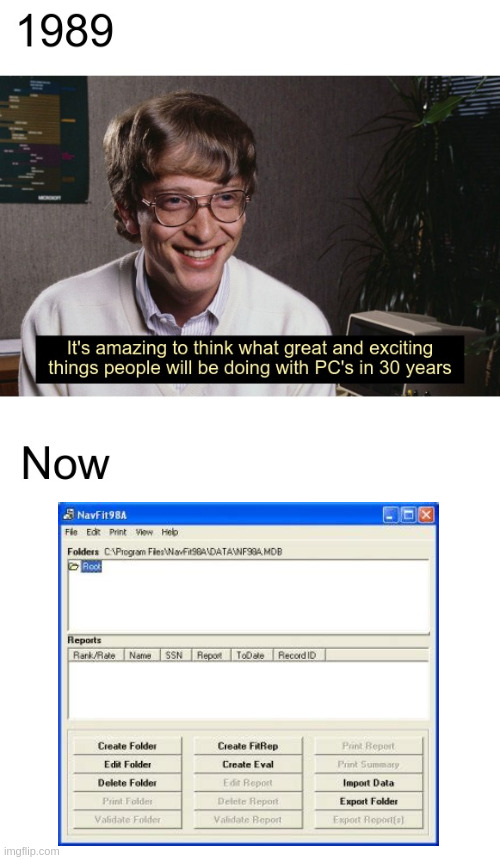
Twenty years passed, and NAVFIT98 hadn’t received significant updates. In that time, it became an emblematic of the “if it ain’t broke don’t fix it” mentality. NAVFIT98 is still buggy, crashes often, occasionally loses users’ data, has printing inconsistencies2, is difficult to install3 (and only runs on Windows), imports/exports files in an esoteric format4, and triggers anti-virus on modern computers. According to the user manual, it also requires 850 GB of disk space.
Worst of all, NAVFIT98 lacked the ability to validate reports. What this means: there are specific instructions for the type and format of data that goes into each block/field in a report. If the type or format of the data in the block is incorrect, it invalidates the reports. When an invalid report is submitted to NAVPERSCOM, the command submitting the report is notified that the report must be corrected and resubmitted. Approximately 60k reports each year are rejected. Even worse: 20% of rejected reports are not resubmitted by the originating commands.
Here’s the kicker: every sailors’ report, as per the instruction in BUPERS (about 600k per year) is physically mailed to NAVPERSCOM, where each report is manually scanned and uploaded into a sailor’s record?5 The Navy is the only branch that uses physical paper for preformance evaluation reports.6
So what?
Administrative tasks are vital to a functioning fighting force, but they shouldn’t get in the way of a warfighter’s primary job. Unnecessary friction in admin tasks results in cutting corners, wasted time, and rejected reports.
From a talent management perspective, NAVFIT98 is a pain point - not only for sailors creating their reports, but for NAVPERSCOM as well.
The Navy itself declared that deficiencies in NAVFIT98 were hurting its talent management in NAVADMIN 267/21:
“Dominance of the maritime domain requires innovation and forward thinking. With investments in platforms, weapons and technologies to meet evolving operational conditions, it is imperative that we invest in our most essential warfighting asset, our people. Talent management and modern development approaches are required to attract, develop, train and retain the best and fully qualified Sailors in our Navy.”
eNavFit
To address the issue, that NAVADMIN announced NAVFIT98’s successor: eNavFit.
Here’s eNavFit’s timeline:
- NOV2021: NAVADMIN 267/21 announces eNavFit, a program intended to address the deficiencies with NAVFIT98
- JAN2022: NAVADMIN 004/22 announces plans to sunset NAVFIT98 in late FY 2022
- FEB2022: eNavFit goes online
- NOV2022: NAVADMIN 250/22 acknowledges issues and bugs with eNavFit and pushes NAVFIT98 sunset date back to DEC2023
- NOV2023: NAVADMIN 279/23 acknowledges continued issues with eNavFit, pushing NAVFIT98 sunset date back to DEC2025
- JAN2025: NAVADMIN 012/25 recognizes the failure of eNavFit, and mandates that NAVFIT98 return to fleet wide use beginning MAY2025
- MAY2025: eNavFit goes offline
- Today: Bugs persist in NAVFIT98’s most recent update. The consensus among sailors: NAVFIT98 is still poor software.

What went wrong?
- Poor Software Requirements: eNavFit was built as an online-first app; i.e., it assumed offline usage would be an edge case, and that being offline would not be part of any command’s standard operating procedure. This assumption made its adoption impractical for platforms that routinely have no internet connection (eg submarines).
- Lack of Training: Sailors reported that eNavFit was unnecessarily complicated and they didn’t adequate training to use it.
- Poor Feedback Loops: Sailors did not have an adequate mechanism for giving feed back on eNavFit deficiencies, and updates to fix bugs were slow to be released.
Looking Forward
NAVFIT98 has become emblematic of the “if it ain’t broke don’t fix it” mentality prevalent in the military. It’s easy to look at a case study like this and become disheartened at the Navy’s approach to talent management, but I don’t think this issue is specific to the Navy; change is hard in any massive organization, particularly when it tries to design a new system.
But I was curious - is it really that hard to create a replacement for NAVFIT98? One that’s easy to install, cross-platform, does better validation, and uses more modern file formats to import/export data7?
I gave it a crack, and built a replacement: NAVFITX
(I’m open to suggestions for better names.)
Feel free to try it out and let me know what you think! It’s still in alpha, needs more features, and only creates FITREPs at the moment (EVALs and CHIEFEVALs coming soon).
Who knows if the Navy will continue to use NAVFIT98 in perpetuity. In the meantime, I’m hoping this will help sailors simply trying to get a program installed at home to create their performance evaluations.
To be clear: I’m not commenting on the metrics the Navy uses for talent management, only the software.
There are exceptions - for example, some admin departments in the Navy find that it’s more work to require everyone to learn and use NAVFIT98, so they solicit the necessary information from each sailor and then create the reports themselves. ↩︎
NAVFIT98 is supposed to be a WYSIWYG (What-You-See-Is-What-You-Get) app. It presents a virtual document on the screen that looks like physical paper report. When the report is printed, it’s supposed to look like the virtual document in the NAVFIT98 app, but this isn’t always the case. Words or lines of text get cut off, and text isn’t always aligned properly. When speaking to the admin department at my last command, I was told by the sailor responsible for submitting the reports that the alignment issue was especially infuriating given the instruction from the command (very commonly required throughout the Navy, though not strictly required) that the first and last line of the “Comments on Performance” block be center aligned. Center aligned text in NAVFIT98 would appear correctly in the app, but print differently (and not center-aligned). After much failed troubleshooting, the sailor fond that the “easiest” way to solve the issue was to print the report with it’s unaligned text, then fix it up in Adobe Acrobat Pro (a licensed PDF editing software). ↩︎
It took me 30 minutes with google to figure out where to find the download files and dependencies and get NAVFIT98 running. Maybe this was a skill issue, but I thought the location of the files was rather unintuitive. See if you can beat my time! ↩︎
Aside from PDFs, the only way to export data is to a Microsoft Access Database file (.accdb). This choice to use this uncommon file format limits NAVFIT98’s compatibility with modern software. Additionally, sailors have reported problems when importing .accdb files into NAVFIT98. Without a working method to export/import report data, sailors resort to using text editors, email, and other third-party tools to route data for each block in their reports to their CoC. This slows the process, and results in a higher rate of rejected reports (since no software validation is used on input data). ↩︎
I couldn’t believe it either - ask your N1 and they’ll confirm it! ↩︎
The Army, Marine Corps, and Air Force uses web apps rather than physical paper. ↩︎
NAVFIT98 uses
.accdb(Microsoft Access Database) files. And if you try to import NAVFIT98A v32.accdbfiles into NAVFIT98 v33 you’ll encounter an error! NAVFITX uses sqlite3, but I plan on adding more formats later. Soon you’ll able to write your report as a text file, then convert it into a PDF using NAVFITX. ↩︎